The supply
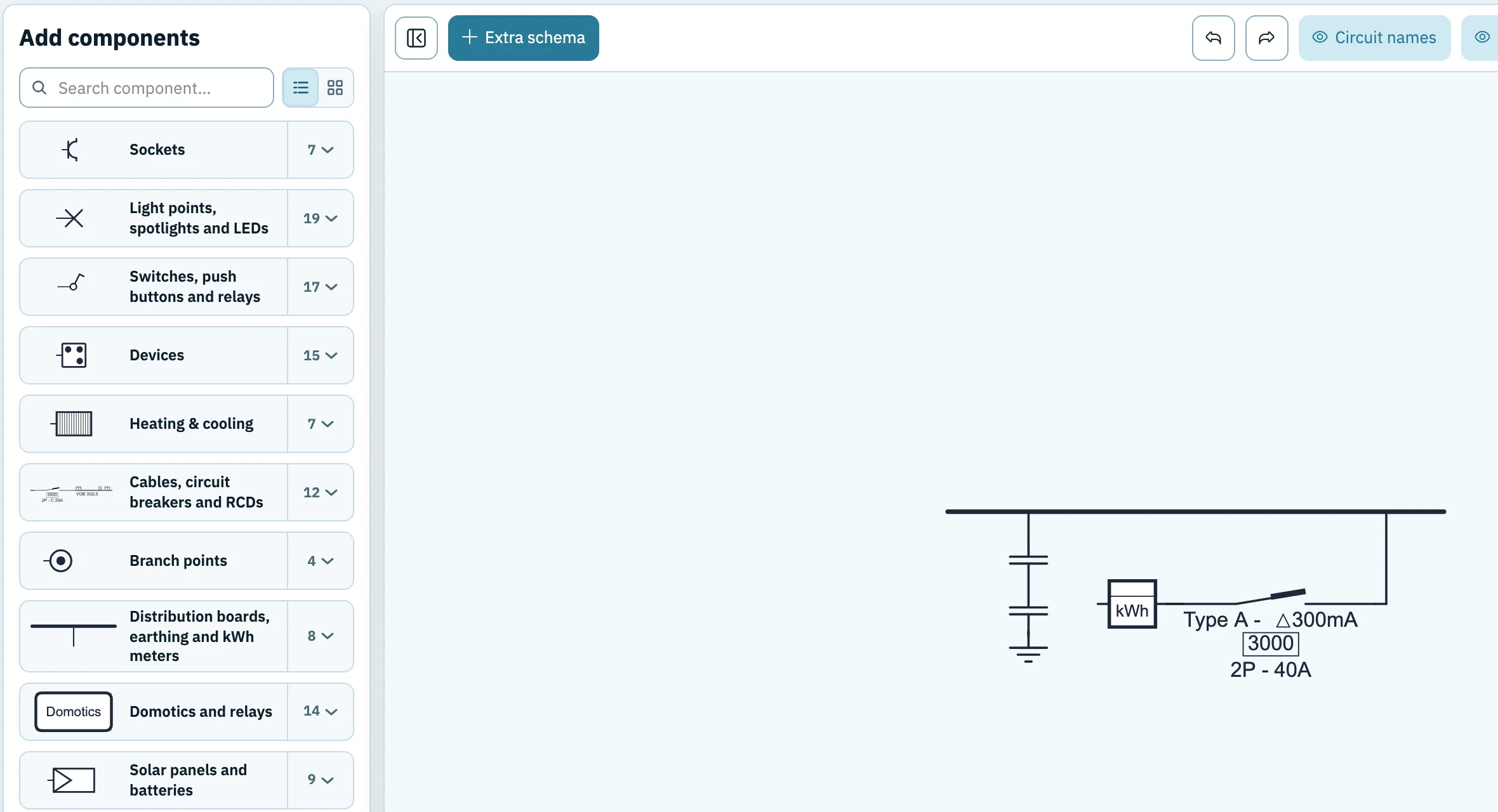
Meter, main switch with type, poles, current and Δ300mA, distribution board, earth disconnect link and earthing. The voltage and type of current, for example 230 V AC.
The first time you see a single-line diagram, it looks like a tangle of lines, letters and numbers. Yet it follows a fixed logic: from the meter to the distribution board, and from there circuit by circuit to every light point and every socket. In ten short lessons you learn to draw up a single-line diagram yourself using that logic. No prior knowledge is needed. Together we draw one house in 1wire, from the first circuit to the plan for the inspection.
Follow them in order: each lesson adds a piece to the same example house. After lesson 10 you have a complete single-line diagram and floor plan. For the example house, allow about two hours; tracing the circuits of an existing house can take much longer. Open the free drawing sheet in a second window and draw along. You don't need to create an account.
After this lesson you know which two plans you draw up, what goes on them and how a diagram is built.
In Belgium, an electrical installation is described by two drawings that belong together. Together they form the plan that the inspector lays next to the installation during the inspection, and that then stays in the electrical file of the house. The plan must show the installation as it was actually built.
The name “single-line” comes from the most important convention: one line represents the whole cable, even though in reality three, four or five conductors run side by side. How many there are and how thick they are is written in a code next to the line.
You draw the diagram from the supply to the loads. The supply comes in at the bottom: the grid operator's connection with the electricity meter. Next comes the distribution board, a long horizontal line. From that line the circuits run upwards, each with its own capital letter. You build each circuit from the bottom up: first the protective device, then the cable, then the switches and loads.
Below is what we are working towards: the complete diagram of the example house, a house with a ground floor and a first floor. In the next lessons you draw it yourself, piece by piece.
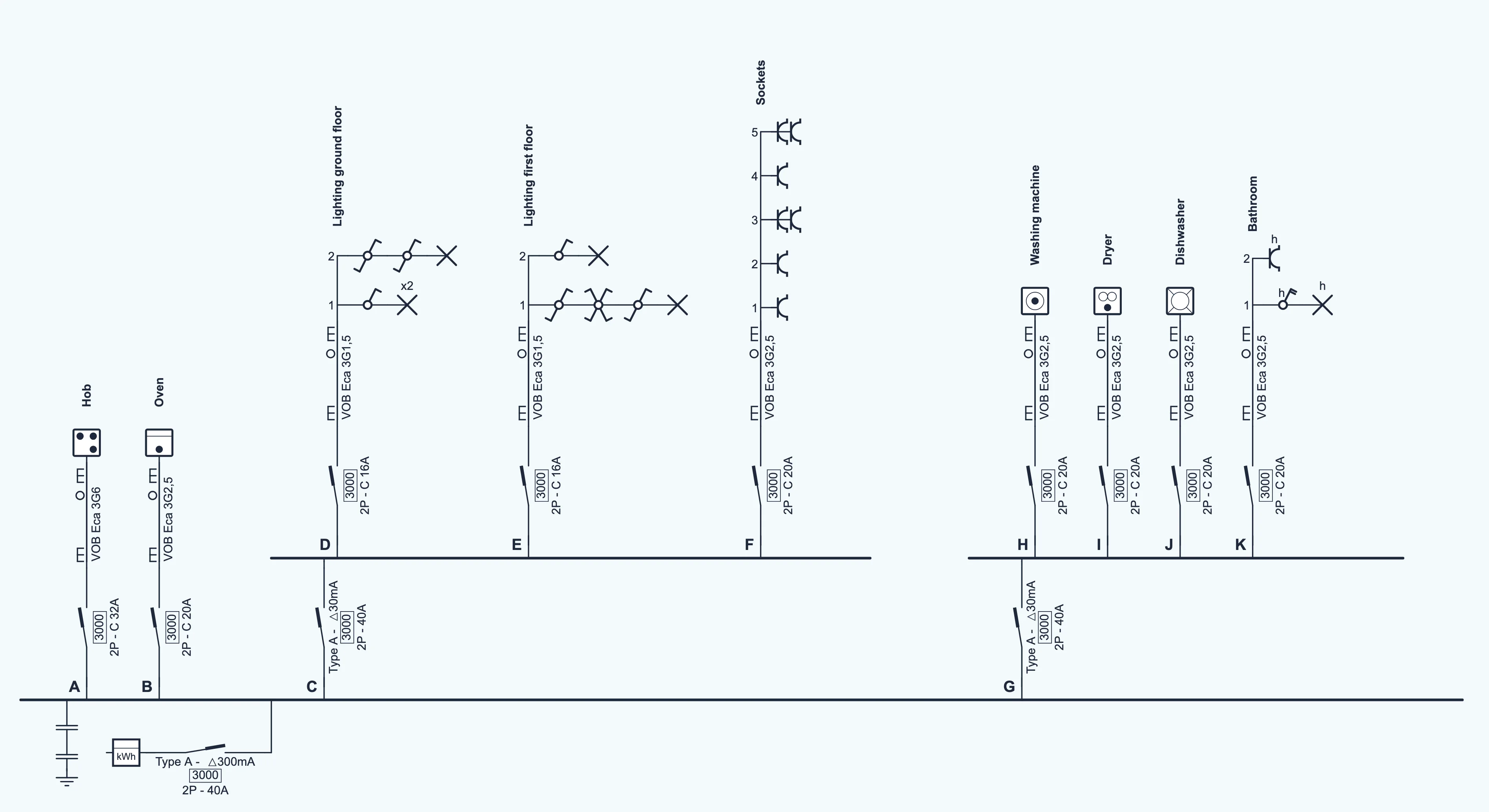
The supply: meter, 300 mA main switch and earthing. You draw it in lesson 3.
Two circuits directly on the board: the hob and the oven. That is lesson 4.
A 30 mA RCD with its own rail: the lighting (D, E) and the sockets (F). That is lesson 5.
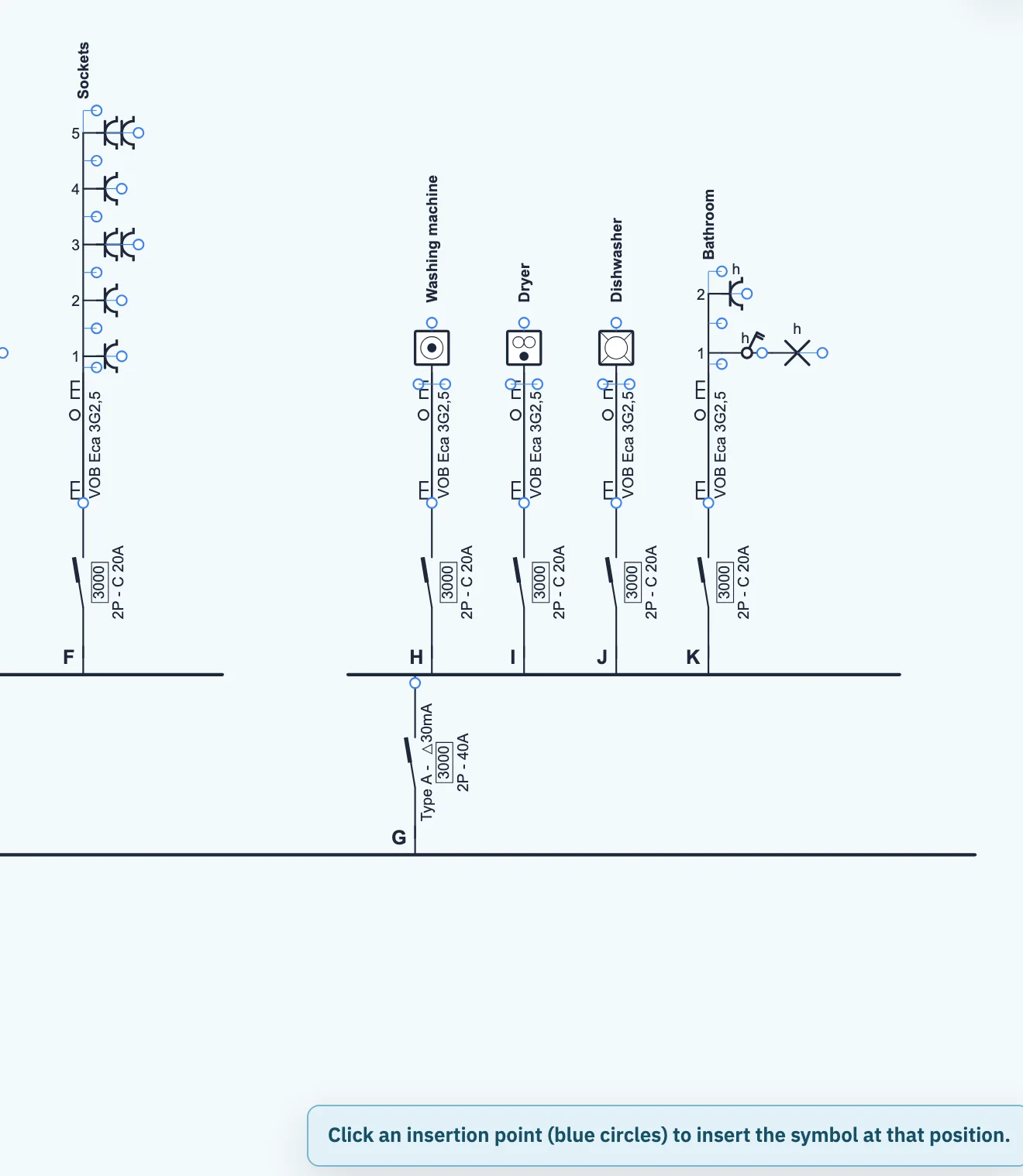
A second 30 mA RCD: washing machine, dryer, dishwasher and bathroom (H to K).
If you work without an account, 1wire keeps your drawing temporarily in your browser. With a free account, everything is saved online automatically.
Manual: a tour of 1wire → See an example diagram first →After this lesson you know which circuits you draw: for a new house you divide it into circuits, for an existing house you trace the circuits. That is the work that comes before drawing.
A circuit is everything behind one circuit breaker (often simply called a “fuse”): the cable, the switches, the lamps and the sockets. If you start drawing straight away, you often have to rearrange things afterwards. So first find out which circuits there are. How you do that depends on the house.
Go through the house room by room and list what will be there: light points with their switches, sockets and fixed appliances. Then divide them into circuits according to these rules:
In an existing house, the division is already fixed. You trace it, starting from the distribution board:
Only operate the switches in the board; don't open the board, any box or any socket. What you cannot see, such as the cross-section of a cable buried in the wall, ask an electrician.
This is how our example house, a new installation, is divided. 1wire assigns the letters A to K itself, according to the position of each circuit on the board. and are the two 30 mA RCDs: they get a letter too.
| Circuit | Purpose | What is on it | Behind |
|---|---|---|---|
| Hob | the hob in the kitchen | 300 mA | |
| Oven | the oven in the kitchen | 300 mA | |
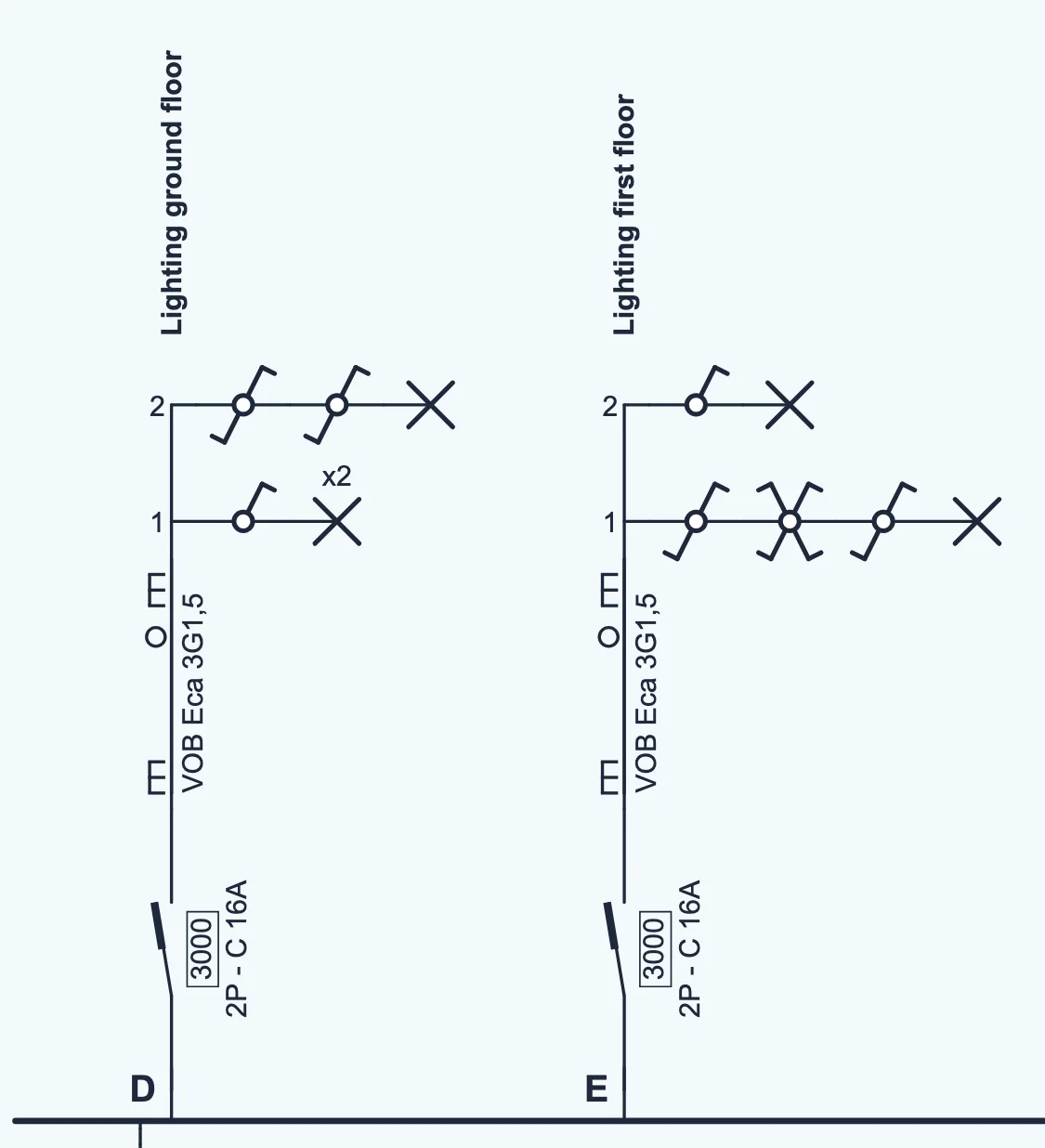
| Lighting ground floor | living room (2 lamps, 1 switch), stair light (switch at the bottom and the top) | 30 mA (C) | |
| Lighting first floor | bedroom (3 switching points), landing | 30 mA (C) | |
| Sockets | 5 socket groups in the living room, 2 of them double | 30 mA (C) | |
| – | Washing machine, dryer, dishwasher | each appliance its own circuit | 30 mA (G) |
| Bathroom | lamp with waterproof switch, socket | 30 mA (G) |
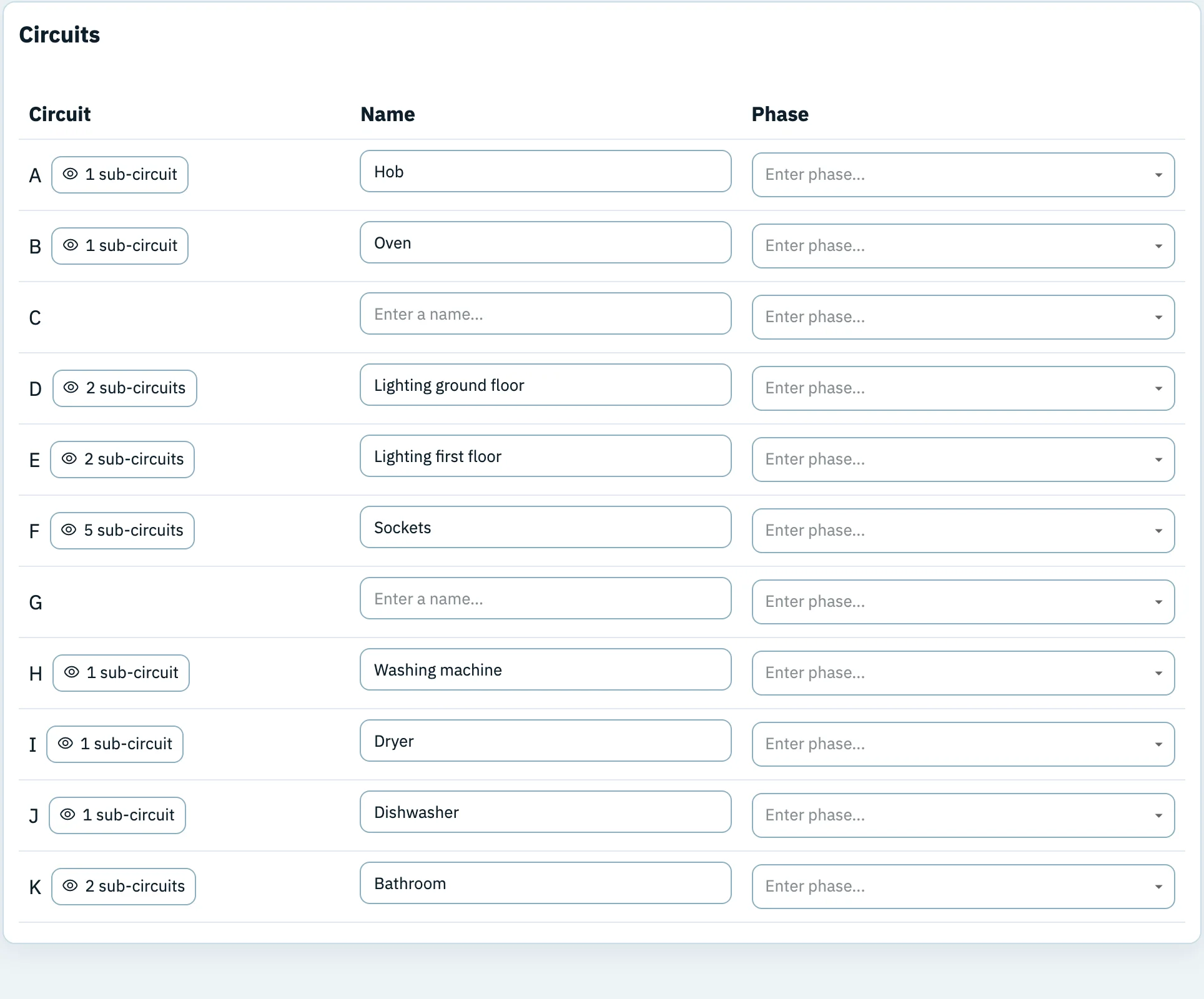
In 1wire your division shows up in the Circuits tab: a list of all circuits with their letter, their number of points and their name. You fill in the names as you draw (lesson 6), and can look them up there at any time.
After this lesson the start of every diagram is on your drawing sheet: meter, main switch, distribution board and earthing.
The supply sits at the bottom of every diagram. It consists of four parts:
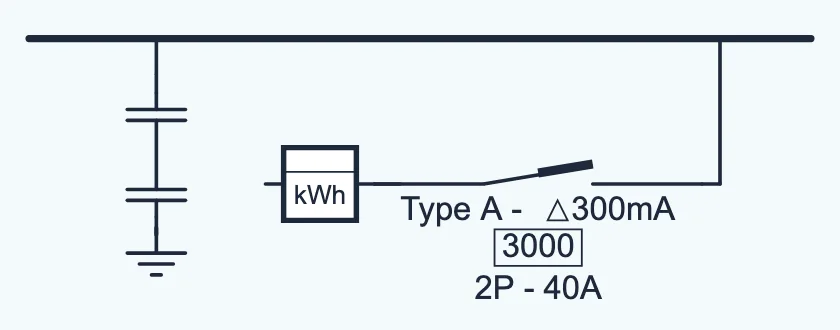
The type of connection determines how many conductors come in, and so usually also how many poles the main switch has. You write that on the diagram as 2P, 3P or 4P. The table gives the usual cases. When you draw an existing installation, copy what is on the main switch itself: sometimes, for example, there is a four-pole device on a three-phase supply without neutral, connected according to the manufacturer's diagram.
| Supply | Supply conductors | Usually | Where you find it |
|---|---|---|---|
| 230 V single-phase | 1 phase + neutral | 2P | Most homes, like the example house. |
| 230 V single-phase on a 3 × 230 V network | 2 phases, no neutral | 2P | Older networks, in part of the country. |
| 3 × 230 V | 3 phases, no neutral | 3P | Three-phase on those same older networks. |
| 3 × 400 V + N | 3 phases + neutral | 4P | New builds and homes with heavy loads such as a heat pump or a charging point. |
All metal enclosures and the green-yellow protective conductors are connected to the earth. If a live conductor touches a metal cabinet somewhere, the current flows away to earth instead of through whoever touches the cabinet. That is why the inspector measures the earth resistance of the earth electrode. The AREI aims for at most 30 Ω and never allows 100 Ω or more in a home. Between 30 and 100 Ω, stricter rules apply to the RCDs (lesson 5).
After this lesson you choose the right circuit breaker for each circuit and draw the first circuits on the board.
Each circuit starts on the board with its own protective device. It protects the cable against too much current, because a conductor that has to carry too much current heats up and can start a fire. Too much current arises in two ways:
A circuit breaker or a fuse protects against this: both then switch the circuit off.
In everyday speech they are used as synonyms. Many people say “the fuse has blown”, even when the board has a circuit breaker. Technically they are two different devices:
Both protect the cable against overload and short circuit, but they are not interchangeable at the same rating: on 2.5 mm² a circuit breaker may go up to 20 A, a fuse only up to 16 A (see the table below). If an older home has fuses, you draw fuses, because the plan shows what is actually there.
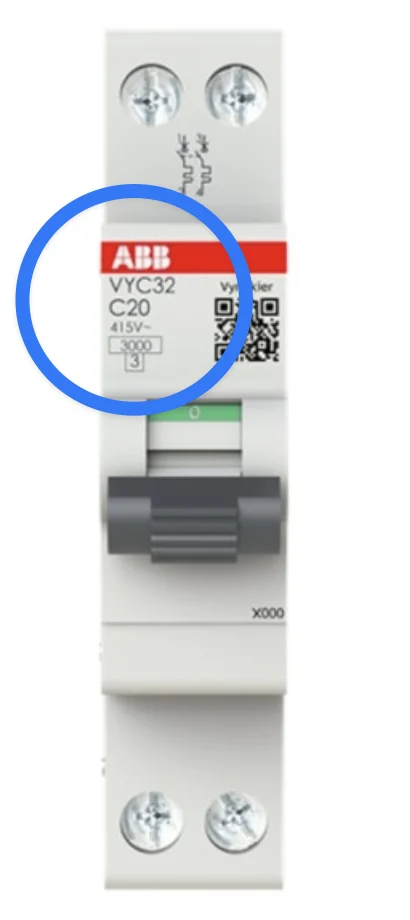
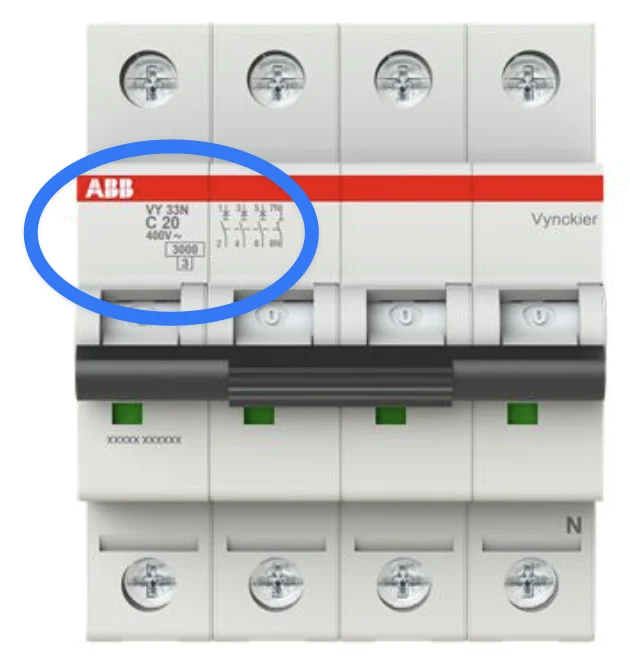
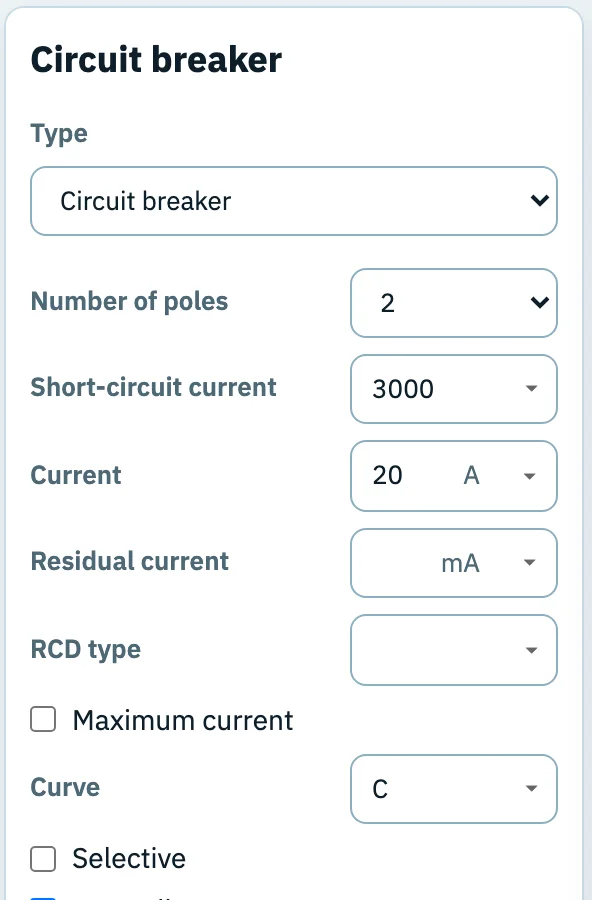
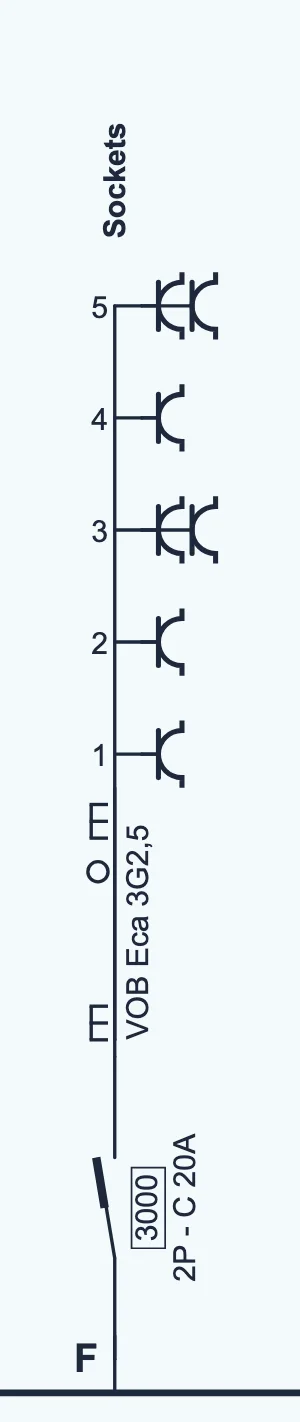
Next to each circuit breaker you write its characteristics. For (sockets) of the example house that is 2P - C 20A with a box 3000:
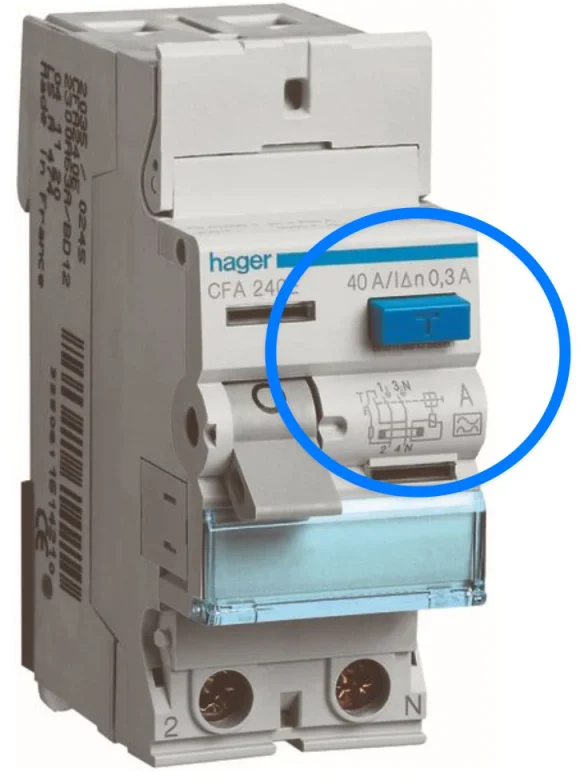
The same data is on the front of every circuit breaker in the board, usually just below the brand. So you can fill in the diagram simply by looking in the distribution board:
Which breaker you choose depends on the cross-section of the cable behind it. A thin conductor can carry less current, so it needs a smaller protective device. The table gives the upper limit per cross-section in a home (AREI, table 4.11); a bigger breaker is never allowed. Whether a combination is really suitable also depends on the load, the installation method and the length of the cable (voltage drop). The electrician works that out. For the same cross-section, the limit for a fuse is lower than for a circuit breaker.
| Cross-section | Max. circuit breaker | Max. fuse | In the example house |
|---|---|---|---|
| 1.5 mm² | 16 A | 10 A | Lighting and : 16 A |
| 2.5 mm² | 20 A | 16 A | Sockets, oven and appliances: 20 A |
| 4 mm² | 25 A | 20 A | — |
| 6 mm² | 40 A | 32 A | Single-phase hob : 32 A |
| 10 mm² | 63 A | 50 A | Supply to a board or a large load |
After this lesson you know which circuits go behind a 30 mA RCD, what changed about that in 2023, and you draw each RCD with its own rail.
An RCD (residual current device, also called a differential switch) compares the current that leaves through the phase with the current that comes back through the neutral. If current leaks away somewhere, for example to earth through a faulty washing machine or through someone touching a conductor, less comes back. That difference is the leakage current. If it gets too large, the RCD trips within a fraction of a second.
On 1 June 2023 the AREI rules for homes became stricter. For a new installation the rules are now, if the earth resistance is at most 30 Ω:
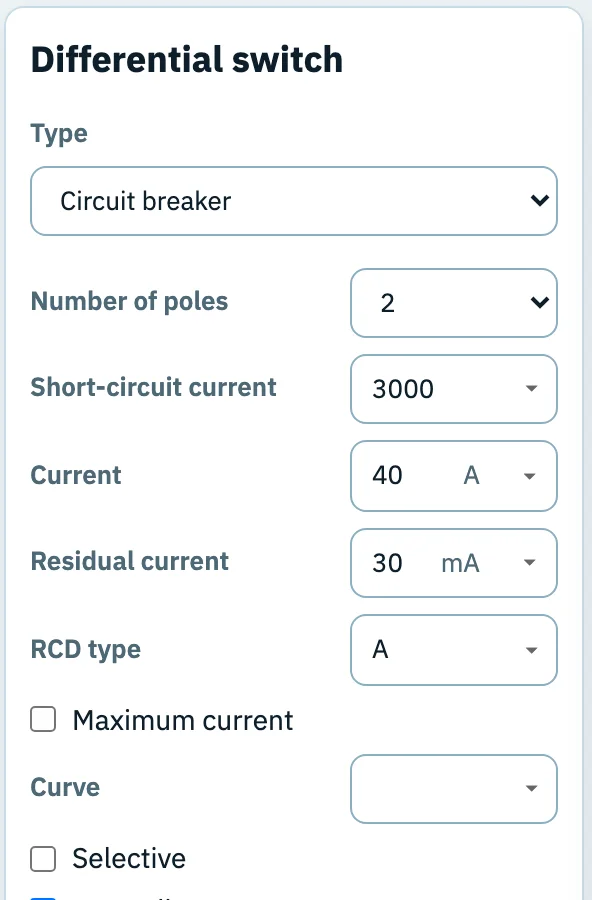
The diagram shows the type and characteristics of each RCD. In a home, type A is the minimum, and the RCD at the origin of the installation is rated at least 40 A.
The example house follows these rules. protects the lighting and the sockets (, and ), the washing machine, the dryer, the dishwasher and the bathroom (H to K). A single RCD for all seven circuits would also be allowed, but with two, a leakage current only cuts off part of the house. In a larger house, the lighting is often spread over both RCDs, so that the lamps never all go out at once.
On the diagram, each RCD sits on the main board, with its own rail behind it. All circuits on that rail are protected by the 30 mA. Each circuit still keeps its own circuit breaker: the RCD watches for leakage current, the breaker for overload and short circuit.
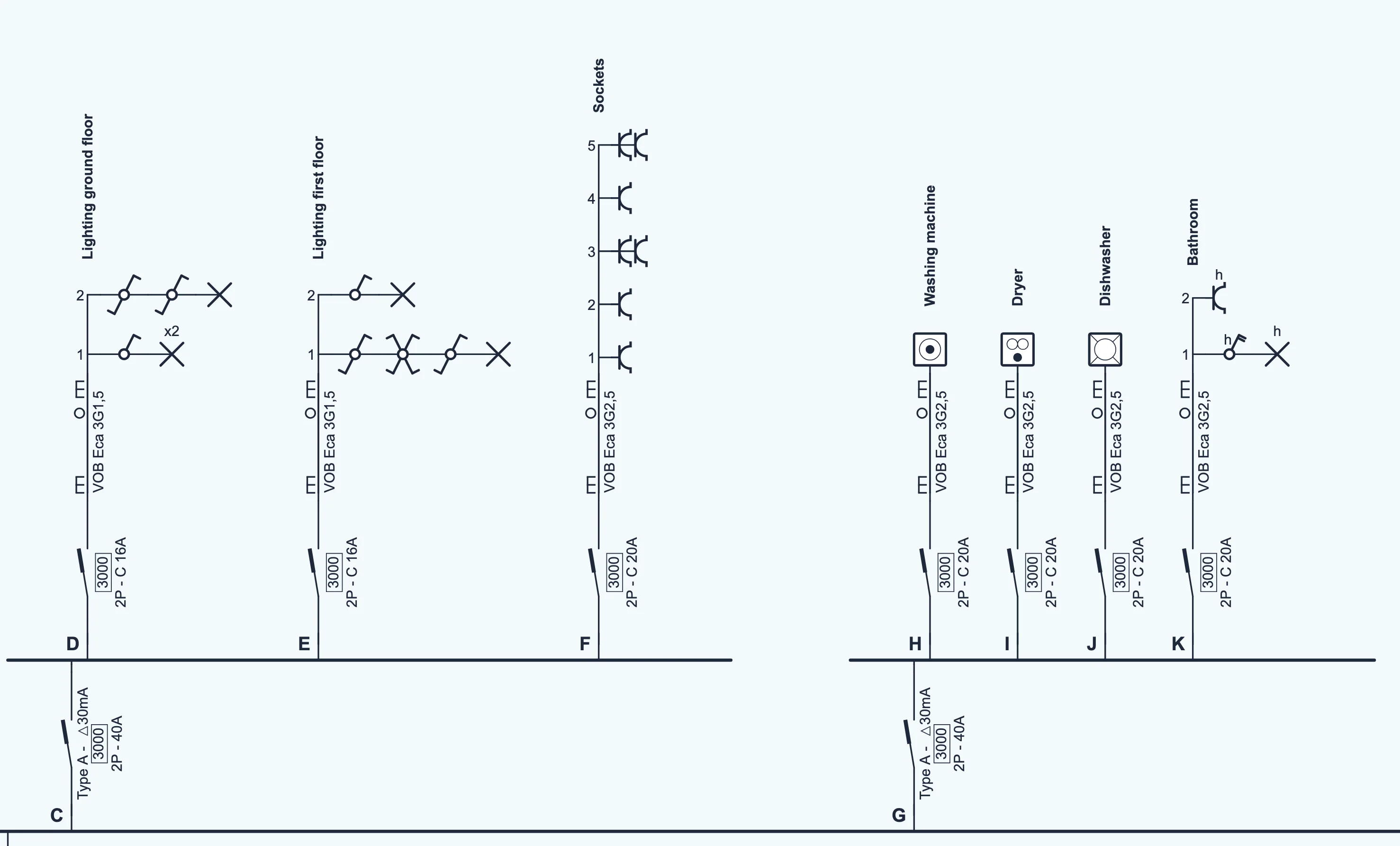
For both RCDs of the example house you write Type A - Δ30mA, 3000 and 2P - 40A. Don't mix up two numbers:
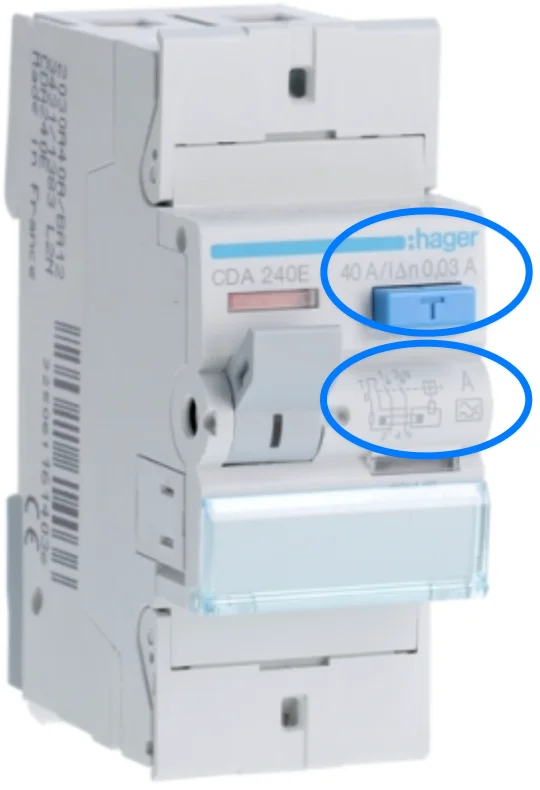
Look in the distribution board and you will find everything you need for the diagram on the front of the RCD:
Many homes were wired before June 2023. There, the lighting and the sockets often sit directly behind the 300 mA, and there is only one 30 mA RCD, for the bathroom and the laundry. The 2023 rules apply first and foremost to new installations. For existing installations and for minor changes or extensions to existing circuits, the AREI provides exemptions and transitional rules. Some new rules do apply to everyone, such as the ban on type AC. Whether your installation is in order is for the inspector to judge.
Parts installed before 1 October 1981 are marked “old installation” (“oude installatie”) on the single-line diagram.
If you draw an existing house, draw what is actually there, even if it looks like the example below. Never adjust the plan to the rules: the inspector compares the plan with the installation.
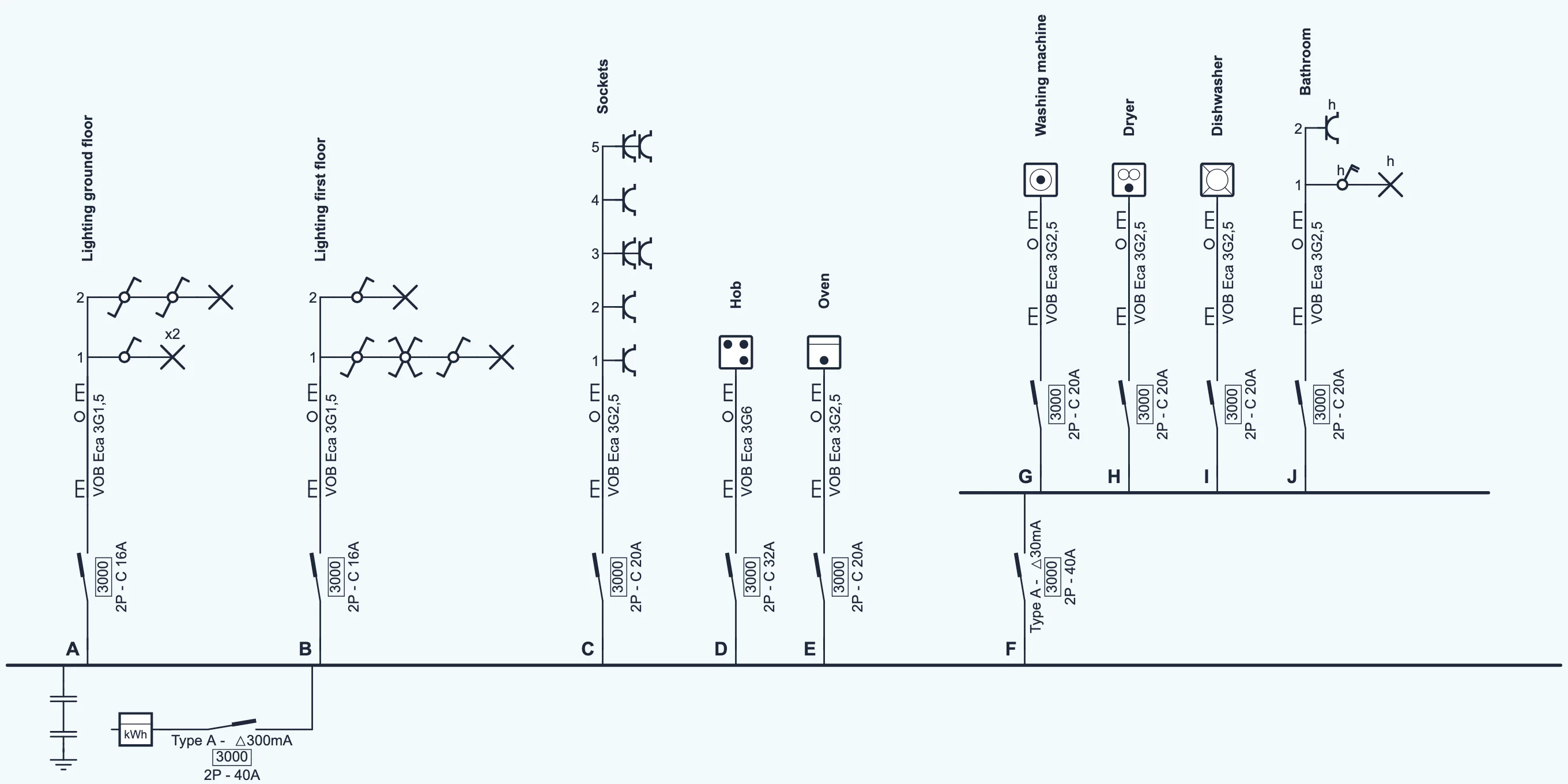
1wire also gives the branches with the RCDs themselves a letter, and , so you can refer to them by name. Their name stays empty.
After this lesson you write the right code next to every cable and give every circuit a name.
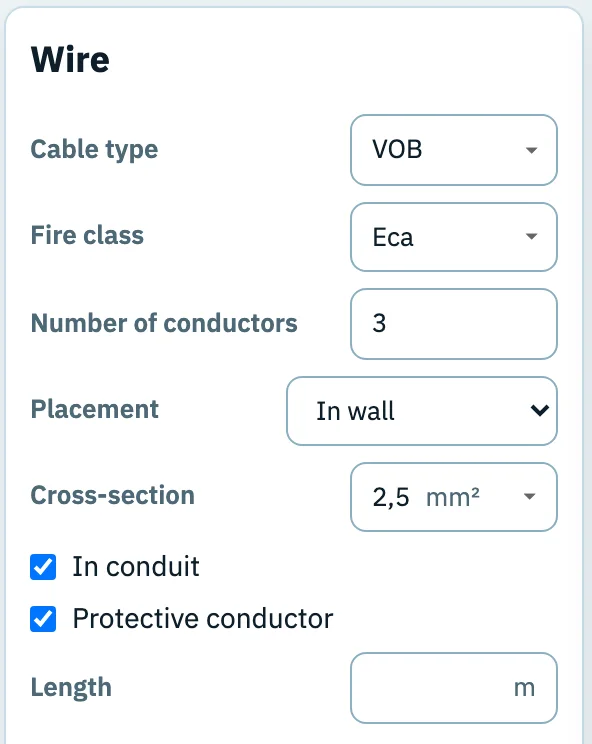
Above each circuit breaker, the cable runs to the points of the circuit. On the diagram that is one line with a code next to it. For of the example house it is VOB Eca 3G2,5:
Besides VOB you will often come across XVB: a cable with a sturdy outer sheath that may also be laid on or in a wall without conduit. Underground it goes in a conduit; where and how a cable may be laid is in the manufacturer's data sheet. Choose the cross-section to match the breaker from lesson 4: 1.5 mm² for lighting, 2.5 mm² for sockets and most appliances. The small marks on the line show how the cable is installed. In 1wire the two E marks mean “built into the wall” and the small circle “in conduit”.
Junction and connection boxes also belong on the diagram. In 1wire you find them in the Branch points group.
Within a circuit, each point gets a sequence number. That creates a label such as : circuit F, point 3. That label later also appears on the floor plan, and that is how the two plans are linked. Also give each circuit a clear name, such as “Lighting first floor”. That helps the inspector, and later the occupant when something fails.
You don't draw colours on the diagram, but you need to know them to compare the diagram with the installation:
| Conductor | Colour | Function |
|---|---|---|
| Protective conductor (PE) | green-yellow | connects metal parts to earth; never use it for anything else |
| Neutral (N) | blue | the return path of the current |
| Phase (L) | brown, black or grey | the conductor that is live |
After this lesson you choose the right switch for one, two or three switching points and draw the lighting circuits.
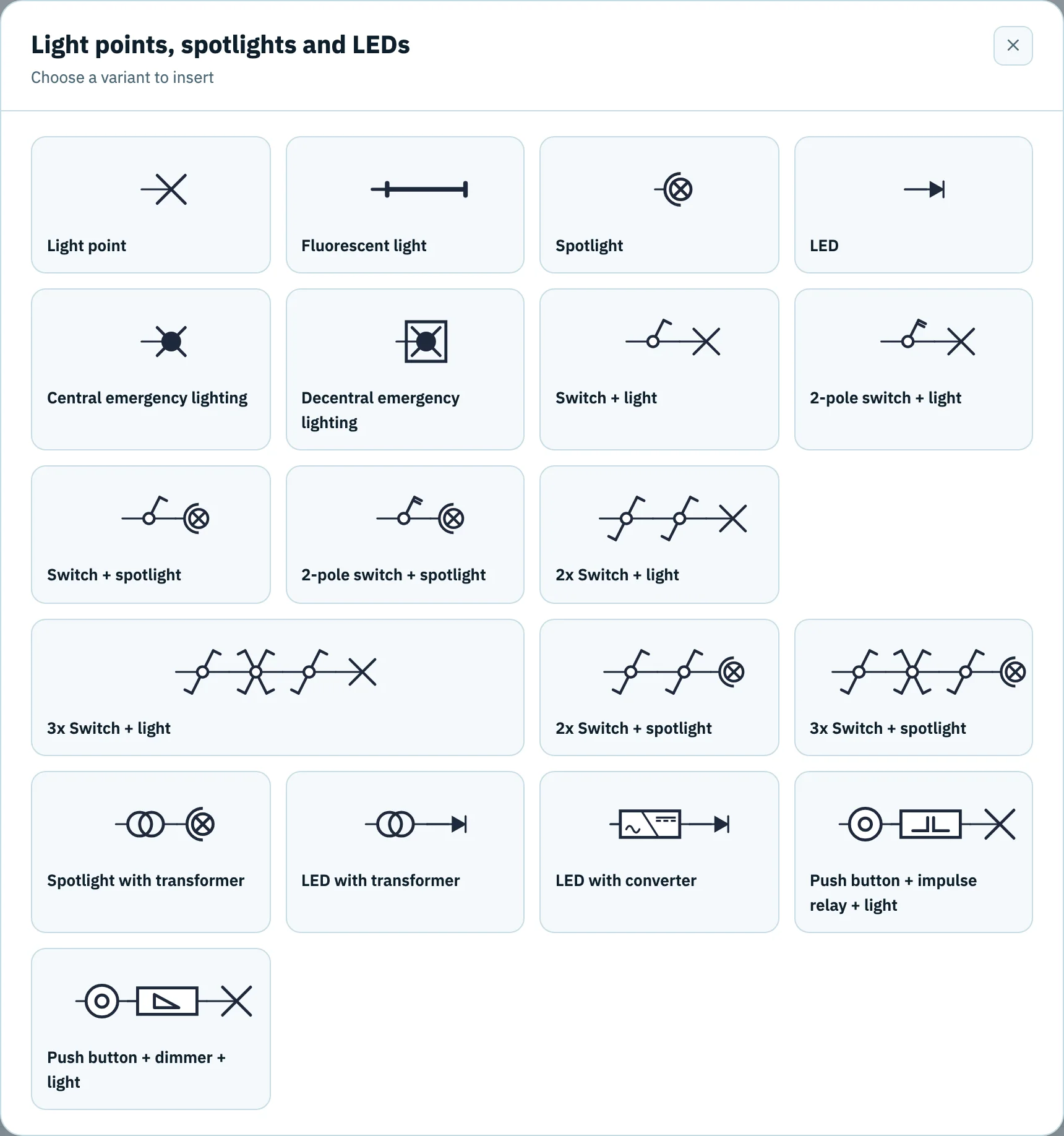
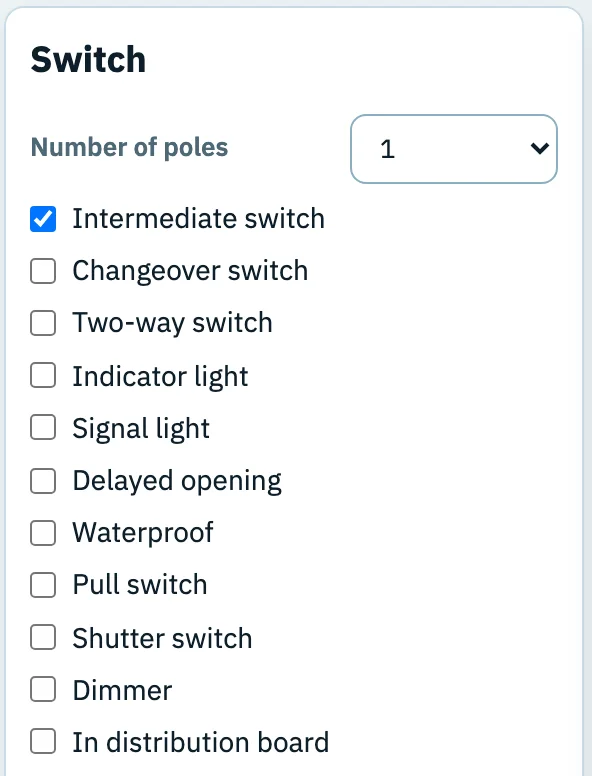
A light point is a small cross. A switch is a small circle with a slanted arm. The shape of that arm tells you which kind of switch it is. Which one you choose depends on from how many places the light must be switched:
| Switch | Symbol | When do you choose it? |
|---|---|---|
| Single-pole |  |
One lamp or group of lamps, switched from one place. The switch only breaks the phase. |
| Double-pole |  |
Breaks both phase and neutral. A good choice in damp rooms such as the bathroom. |
| Two-way switch |  |
Always in pairs: switching one lamp from two places, such as the top and bottom of a staircase. |
| Intermediate switch |  |
Between two two-way switches, for three or more places. Each extra place is one more intermediate switch. |
Each lamp with its switches is one point on the circuit. Two lamps you want to switch separately become two points.
After this lesson you draw sockets and fixed appliances, and choose the cable for a hob.
A socket is a half arc with a short stroke: the stroke is the earth. A double socket gets two arcs side by side, a triple three. On you draw five socket groups: single at points 1, 2 and 4, double at points 3 and 5.
Sockets in a home must have child protection: shutters that close off the holes. On the diagram you see this from the short strokes at both ends of the arc.
Fixed appliances are small squares with their own sign inside. is the hob (four cooking zones), the oven. Each appliance gets its own circuit breaker and cable.
A small “h” next to a symbol means it is waterproof. You use it in the bathroom: for the lamp, the switch and the socket of . That letter alone does not make equipment suitable for every spot: in a bathroom, the zones around the bath and shower determine which equipment is allowed where and what degree of protection (IP) it needs.
is a mixed circuit: lighting and a socket together. Because there is a socket on it, the rules for a socket circuit apply to the whole circuit: at least 2.5 mm² and at most eight points. A light point, or a group of lamps with one common switch, counts as one socket.
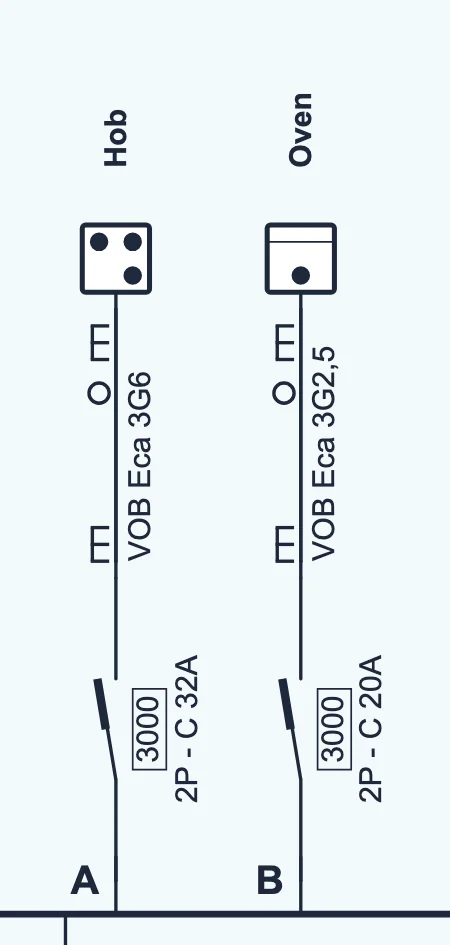
A hob needs a lot of power. In the example house, with a single-phase supply, we choose a 3G6 cable with a 32 A circuit breaker. On a three-phase supply, a hob can spread its power over two or three phases; that needs more conductors, but a smaller cross-section is often enough. How a hob is connected is in the wiring diagram of the appliance itself; the electrician chooses the cable and breaker accordingly. On the diagram you copy what is actually there.
New heavy loads also each get their own circuit with their own circuit breaker. A charging point needs an RCD that also detects DC leakage: a type B, or a type A together with 6 mA DC detection, which many charging points already have built in. Follow the charging point's manual for this. Solar panels connect through the inverter to their own circuit. In 1wire, the charging point and the heat pump are under Devices, the inverters under Solar panels and batteries. For a home battery with backup power there is a separate guide: drawing a backup power circuit.
Everything you draw automatically ends up in the Material list. Handy for checking that you haven't forgotten anything.
See a material list → Manual: the material list →After this lesson you draw the plan of each floor and put every point from the diagram in the right place.
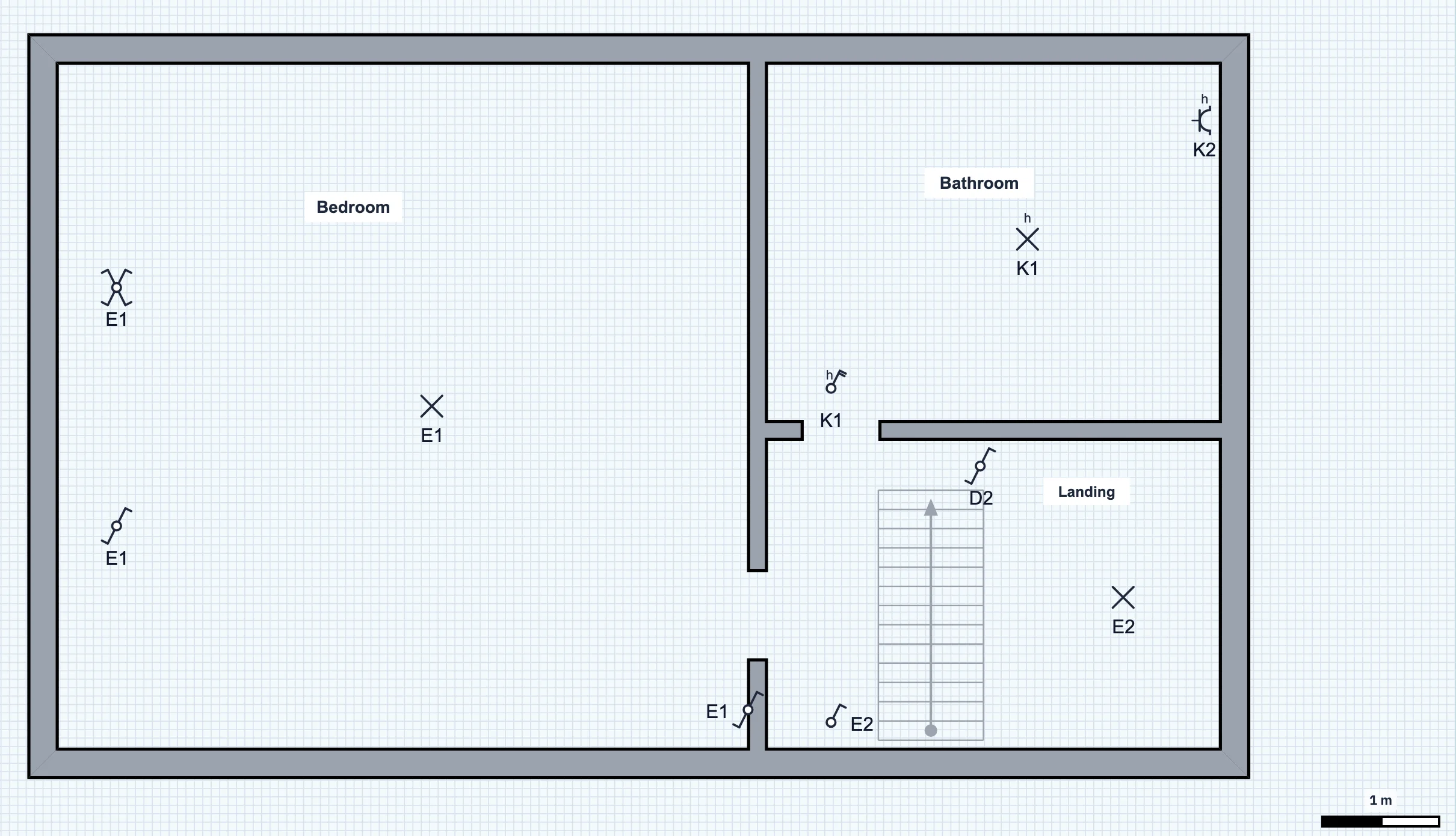
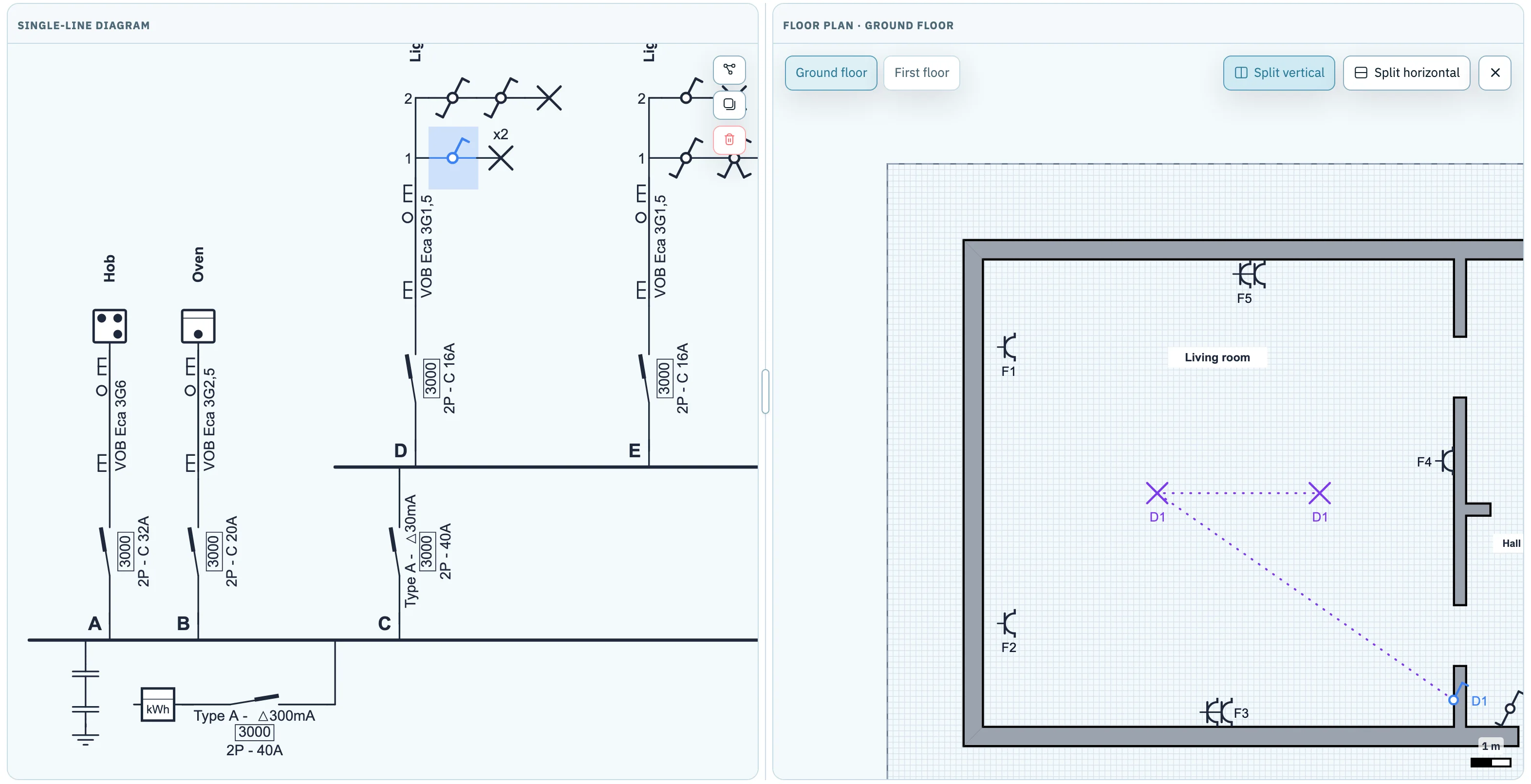
The floor plan is a plan of each floor with the symbols from the diagram. Below each symbol is its label. That label is the bridge between the two plans: on the diagram is exactly the same socket as F3 on the floor plan.
You draw up the floor plan in three steps:
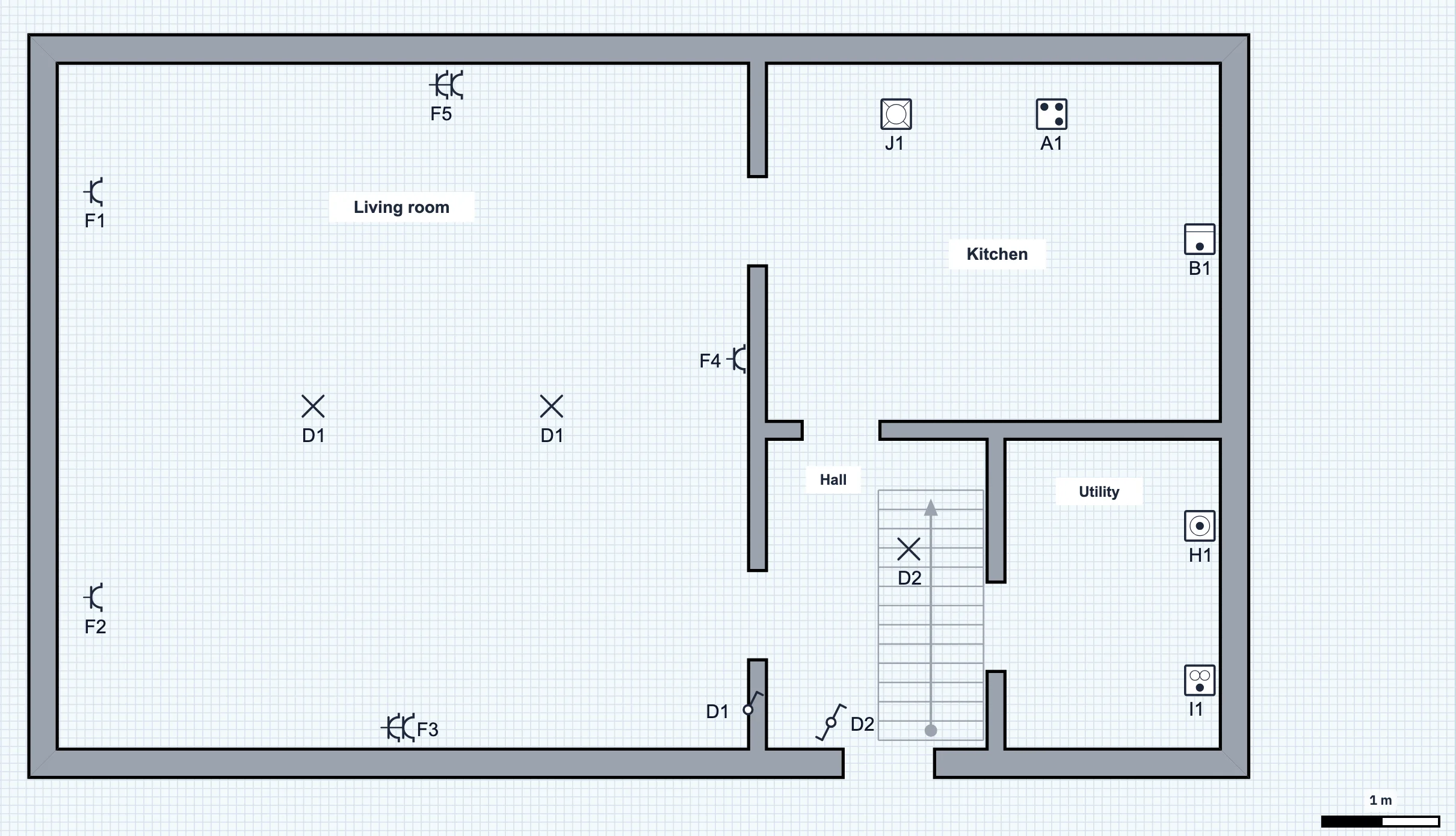
Sometimes more than one symbol carries the same label. Everything with the same label belongs to the same point. Take , the stair lighting: you put the lamp and one two-way switch downstairs in the hall, the second two-way switch upstairs on the landing. So the first floor also has a D2, even though it is on the ground-floor lighting circuit. In the bedroom you place three times: at the door and on both sides of the bed.
Feel free to work with both plans side by side: in the single-line diagram, click Floor plan at the top right. Select a symbol on one side and it lights up on the other side too.
After this lesson you check your plan with a checklist and print it as a PDF.
Before you hand the plan to the inspector, go through it once from start to finish. This checklist follows the same order as the lessons:
Meter, main switch with type, poles, current and Δ300mA, distribution board, earth disconnect link and earthing. The voltage and type of current, for example 230 V AC.
A letter, a clear name and a circuit breaker with poles, curve and current that match the cable.
For each RCD the type, the leakage current and the current. New installation: lighting, sockets, bathroom and laundry behind 30 mA, at most eight circuits per RCD.
Type, fire class, number of conductors and cross-section, for example VOB Eca 3G2,5. No line without a code.
The right symbol for every switch, lamp, socket and appliance. At most eight sockets per circuit, with child protection. The junction and connection boxes too.
Every floor, the distribution board and every point with its label. Nothing left under “Unplaced”.
A plan that is neatly drawn but doesn't match what is in the walls helps nobody. So compare the diagram with the distribution board itself: every breaker on the board belongs on the diagram, with the same value. That also applies to an older installation that doesn't meet the 2023 rules: the plan shows the installation as it is. If something changes in the installation later, update the plan too.
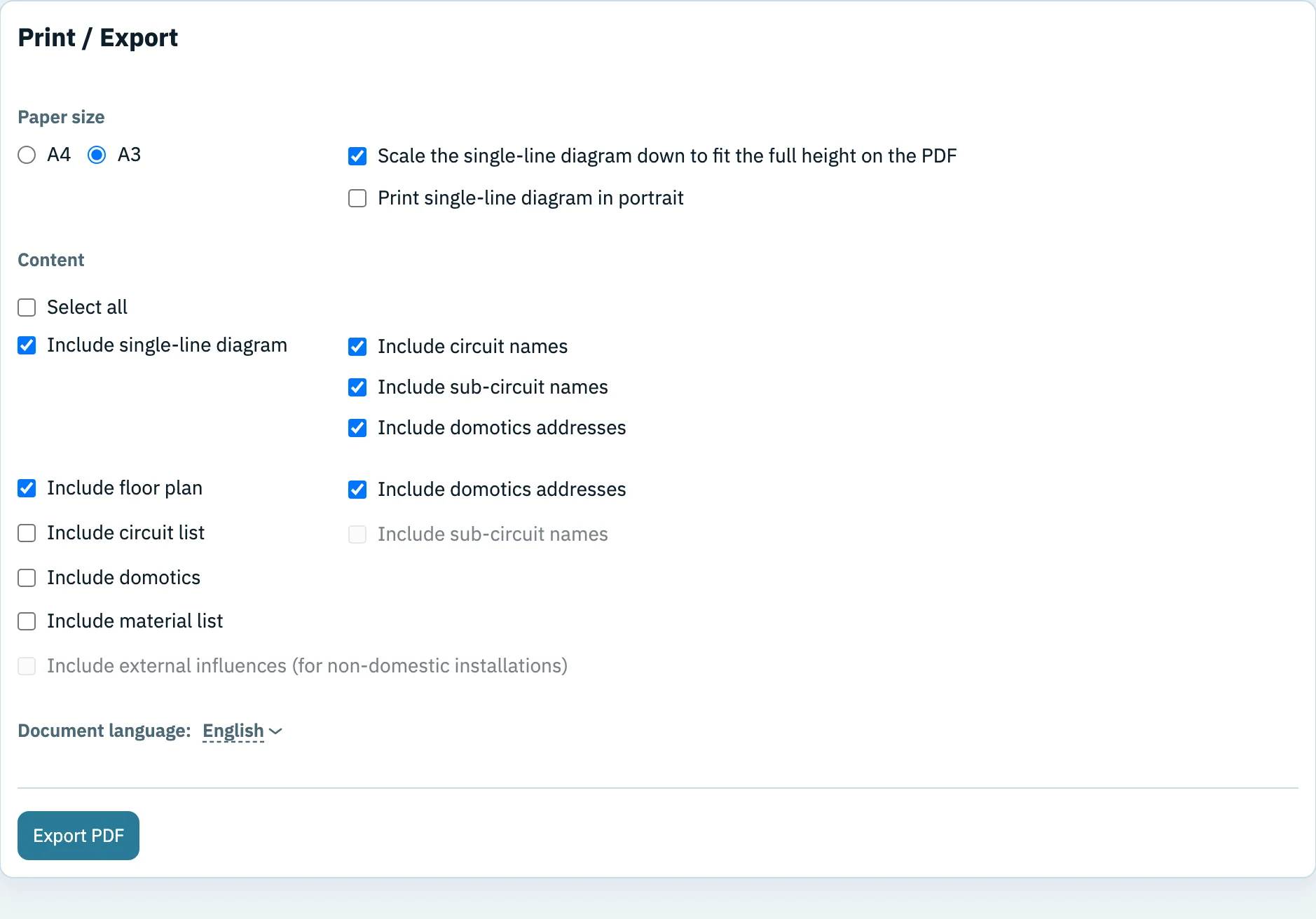
Drawing in 1wire is free. You only pay when you want to print the plan without restrictions.
Manual: printing and exporting → Manual: filling in the project details →A good plan really proves its worth when something goes wrong. If breaker trips in the example house, the diagram tells you that E is the lighting of the first floor, with points (bedroom) and (landing). On the floor plan you see straight away where they are. If trips, the washing machine, the dryer, the dishwasher and the bathroom all go off at once. That often points to a leakage current in one of those appliances. Unplug them, switch G back on and plug them in again one by one: if G trips again, you know which appliance an electrician should take a look at.
Sources (in Dutch): the AREI, Book 1 (low-voltage installations), 2026 edition, published by the FPS Economy, and Volta's overview of the changes of 1 June 2023. Last checked: October 2026.
Start with the supply, add the circuits one by one and then put everything on the floor plan. Free, in your browser, nothing to install.
The single-line diagram shows how everything is connected electrically: protective devices, cables, switches and loads. The floor plan shows where those parts are in the house. Together they form the plan of the installation; labels such as F3 link them to each other.
Because one line represents the whole cable, even though it contains several conductors. The number of conductors and their cross-section are given in a code next to the line, for example 3G2,5.
At every inspection: before a new installation is put into use, when a house is sold and after a major extension or modification. The inspector lays the single-line diagram and the floor plan next to the installation. Afterwards they belong in the electrical file of the house.
No. The example house follows the rules for a new installation from after June 2023. An existing installation often looks different, for example with the lighting and sockets directly behind the 300 mA. You always draw what is actually there. Lesson 5 shows what such an older installation looks like.
Not as the owner: since 1 June 2023 the owner no longer has to date and sign the single-line diagrams and floor plans. If the installation passes the inspection, the person responsible for carrying out the work and the approved inspection body do sign and date them. Each plan also carries a number, a version and the date of that version. For a new installation or a major modification, the name and capacity (and VAT number) of whoever did the work also appear on the plans, as does the address of the installation.
The drawing itself is quick: for an ordinary house with about ten circuits, once you know the lessons, allow a few hours for the diagram and the floor plan. 1wire numbers the circuits and points itself and keeps both plans linked. In an existing house, tracing the circuits often takes longer than the drawing, especially if nothing is labelled on the board.
Yes. You can start drawing in the browser right away, without an account. For students and teachers there is also a free student account. Diagrams from a student account cannot be used as an official AREI plan, though.
No. With 1wire you can scan a photo or PDF of an existing single-line diagram. It is converted into an editable diagram that you can check and complete with these lessons.
The single-line diagram symbols page lists every symbol you can draw in 1wire, with its meaning. For a home battery or an inverter with a backup output there is a separate guide: drawing a backup power circuit.
These lessons teach you to draw up the plan, not to build or change the installation. Work on the installation must comply with the AREI and is checked at the inspection. Leave that work to an electrician.